Wireless explained
Full Wi-Fi bars, slow connection: signal, noise and interference explained.
Learn what Wi-Fi signal strength and SNR mean, why nearby networks share airtime, and how to investigate interference without guessing.

The quick answer
A strong signal does not mean the radio channel is clear. Reliable Wi-Fi also depends on the noise floor, competing transmissions, the client device and the connection behind the access point.
Think of a conversation in a busy café. Hearing one voice loudly does not mean it is easy to understand every word. Wi-Fi has a similar distinction: signal strength is one measurement, while the ability to exchange useful data depends on more than signal alone.
Signal strength: what reaches the receiver
Received signal strength is often shown in dBm. In typical Wi-Fi readings, −55 dBm is stronger than −75 dBm. The bars on a device are only a simplified indicator; their meaning can differ between devices.
SNR: the margin above the noise
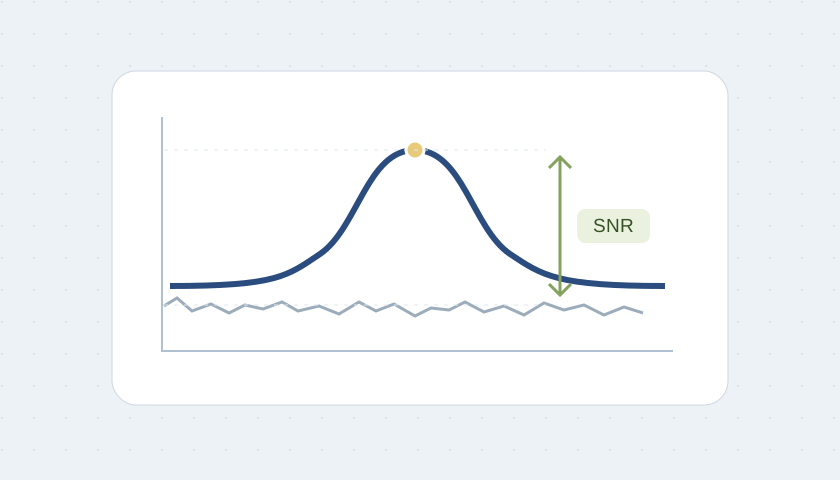
Signal-to-noise ratio (SNR) compares the wanted signal with the noise floor. When both are expressed in dBm, their difference is an SNR in dB.
Other Wi-Fi networks compete for airtime
Nearby Wi-Fi devices on the same channel generally need to share airtime. A channel can be busy even when your own signal is strong. Partially overlapping channels can cause additional interference; more access points on the same channel are not automatically more usable capacity.
Noise is not always another Wi-Fi network
Non-Wi-Fi radio activity can also affect the band. A network-listing app shows nearby Wi-Fi networks, not every source of radio energy. If the problem is intermittent, note what equipment is operating when the disruption starts. A spectrum investigation may be needed to identify the source.
Wider channels are a trade-off
A wider channel can support a higher potential transfer rate, but it also occupies more spectrum. In dense environments, narrower channels may allow a better reuse plan. Channel width should match the surroundings and client capabilities, not simply the largest option in the menu.
A practical investigation for your business
Start with a floor plan and mark where work actually happens: checkout, kitchen, reception, office and guest areas. Record which devices fail and when. Check the same device near the access point and in the problem area. Compare wired performance to avoid confusing a slow Internet uplink with a radio problem.
Ask for a review of signal and SNR alongside channel utilization, retries, client compatibility and upstream links. A single screenshot taken in an empty building cannot describe the lunch rush. Likewise, a coverage map alone does not prove capacity for a busy event.
Improve the environment before buying blindly
The right next step could be relocating an access point, correcting its mounting, refining the channel plan or adding a suitable wired link. Extra hardware is justified when the findings show an unmet requirement. Keep a before-and-after record using the same tasks and locations.
For an event expecting thousands of users, begin with a separate capacity and operations plan: expected concurrent devices, applications, upstream links and support responsibilities. DR WiFi can help define that scope rather than treating attendance as a promise of simultaneous Wi-Fi capacity.